
No code UI automation

About the project
We want to make automation accessible to Cassie, a business user with no technical background. With our no code approach, Cassie will not require any programming knowledge to create her personalized automation solutions. Instead, she will be guided through a conversational interface, where Watson, her AI assistant, will understand her needs, collect the necessary information, and generate the automation skill effortlessly.
This a design driven project where the design team conceptualised the project from scratch, created the entire user journey and multiple iterations.
1 Product Manager
5 developers
2 UX designers
1 Architect
Timeline
4 months
Team
1 Researcher
2 Engineering researchers
My Role - Lead Designer
Persona

Problem

Solution

Process

Competitor analysis


Ideate and design
Iteration 1
Use case
I need to do my monthly task of onboarding new employees. And it is such a tedious task!
- Filling an excel with all candidates' essential information - name, email Ids, address, phone number and joining dates.
Additionally, I need to email each candidate with their joining date.
Lets see, if I can automate this task using using UI Automation.
Key features
-
Cassie manually performs data entry from excel to input fields
-
No validation
-
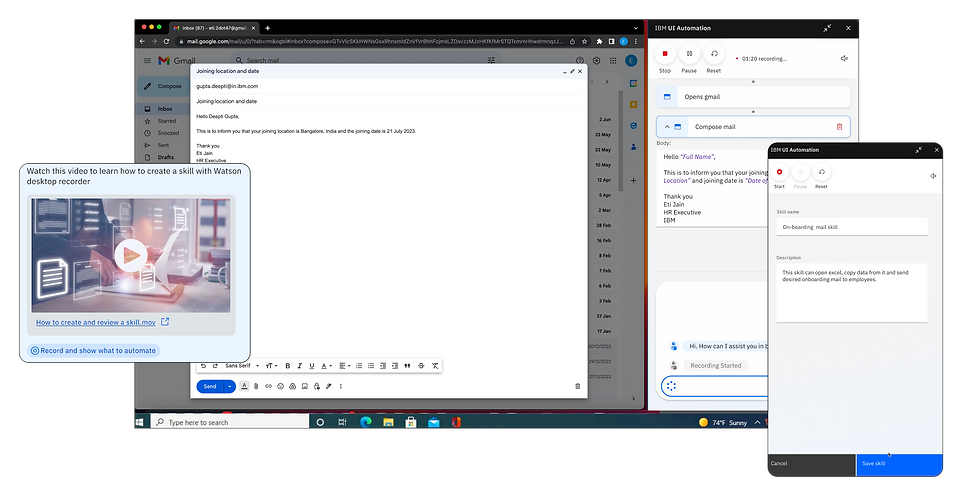
Interface - full side panel on screen
-
Chat is always open
-
Recorded actions shown as steps
-
No screenshots
-
NLP incorporated
-
Cassie can watch watson perform, edit and add to skill catalogue

Iteration 2

Use case
I need to do my monthly task of hiring new employees. And it is such a tedious task!
I need to email each candidate with their joining date. But, I think some email ids are missing from the list.
Lets see, if I can automate this task using using UI Automation.
Key features
-
Dynamic sequencing
-
Chat experience continues from WO to UI automation
-
All steps appear as chat by default.
-
Recorded actions in flowchart in collapsed mode
-
Manual copy pasting from excel
-
Annotated screenshots
-
NLP incorporated
-
Validation of every step with thumbs up and down.
-
Skill running in background


Iteration 3

Use case
I need to do my monthly task of hiring new employees. And it is such a tedious task!
I need to email each candidate with their joining date. But, I think some email ids are missing from the list.
Lets see, if I can automate this task using using UI Automation.
Key features
-
Installation of UI Automation package - browser extension and desktop client
-
Chat experience continues from WO to UI automation
-
Real HR use case - SAP success factors
-
Show stages - record and validate
-
Deletion of a step
-
Manually entering input fields
-
Option to validate later
-
Only critical steps are validated
-
Input fields to be filled before running the skill
-
No run in background - takes over Cassie’s desktop
-
Side panel opens in browser

User Research

“Once I'm familiar with how it's done, I think [creating automations] myself would be my preference…And then ability to update and change it…”
“I'm really keen for [the validation component]…You know, it's like someone starting a new job and someone not asking questions 'cause they didn't want to and then getting a hundred things wrong. I would rather it ask me and get it right”
“HR specialists and HR recruits do not have technical background…[tools that require code to automate are] not even an option”
“For me, trusting a new software or a new tool in general doesn't come naturally of course. So you have to test it, you have to see how it works, you have to monitor it, review it sometimes if necessary…”
“In my ideal world, all systems would all speak to each other and it'd be wonderful…The more that systems can work together, the better”.
Design workshop
Data entry
-
Autofill form fields from file
-
Constant & Variable data input.
-
Supported form fields: Text box, Dropdown.
-
Ambiguity in autofill: Multiple results
-
Missing input fields
-
Wrong value autofilled

Run experience
-
Running skills in the background.
-
Human-in-the-loop exception handling.
-
Unexpected pop-up during run
-
Multiple skills running at the same time
Others
-
Multiple Apps used
-
Conditions for autofill.
-
Remove the chat from the record - alternate record experience
-
Edit and delete actions
Iteration 4
Use case
I need to do my monthly task of hiring new employees. And it is such a tedious task!
- I need to create new candidate profile for each candidate on the HR portals.
- Provision laptop for each employee on the IT portal.
- Update the excel with onboarding status of each employee. She then has to email the excel to her manager.
Lets see, if I can automate this task using using UI Automation.
Key features
-
Installation of UI Automation - desktop client
-
Small floating bar on desktop
-
Show stages - record and validate
-
Deletion of a step
-
Inputs matching source
-
Option to validate later
-
Only critical steps are validated
-
Input fields to be filled before running the skill
-
Run in background
UI automation appears as a small floating bar on the desktop. Only the current action recorded appears in the bar.


UI automation identifies and matches input fields on screen to the inputs in the uploaded excel sheet. The user can verify and edit it further before confirming.

User can further chat with watson and give instructions. Watson also asks questions in case of any queries.


Before validation starts, watson prompts user to upload a file and select from the already uploaded ones.

Validation starts and user has to approve only the critical steps


Validation starts and user has to approve only the critical steps


Validation starts and user has to approve only the critical steps

Skill runs in the background
Skill gets paused incase a manual action needs to be taken by the user.

